Additional Tools
This section contains some code examples and Jupyter notebook tutorials to help you get started with ROSALIA and its functionalities.
Finding the nominal position angle
Due to the asymmetric design of the Nancy Grace Roman Space Telescope, there is an optimal position angle for the observations that maximizes the power in the solar panels and minimizes the stray-light from the Sun. Since the Sun moves across the sky as a function of time, the optimal position angle for a given target will change as well. ROSALIA includes a function based on PySIAF to easily calculate the optimal position angle for the observatory a given target and date. *Note: This function has a known discrepancy of ~0.1 degrees with the nominal PAV3 values estimated by the Roman APT. We are still working on this issue, but the results are sufficiently accurate for most purposes.
import rosalia as rs
# Let's say that we want to observe a target at the following coordinates:
ra = 56.6583333  # Right ascension, in degrees.
dec = +24.1780556 # Declination, in degrees.
from astropy.time import Time

date = Time("2027-06-01T00:00:00") # Date of the observation, in Astropy Time YYYY-MM-DDTHH:MM:SS format.

nominal_PA = rs.telescopes.Roman.get_bestPA(ra=ra_star, dec=dec_star, mjd=date.mjd)
rs.telescopes.Roman.get_bestPA will return the optimal V3 position angle for the observation of a target at the given coordinates and date. The V3 position angle is defined as the angle between the equatorial North direction and the perpendicular vector to the spacecraft sun-shield, measured in degrees. The nominal (best) V3 position angle is the one that minimizes the stray-light from the Sun and maximizes the power in the solar panels. Notice that this angle is different from the position angle of the WFI focal plane, which is defined as the angle between the equatorial North direction and the Y-axis of the WFI focal plane.
Planning offset observations
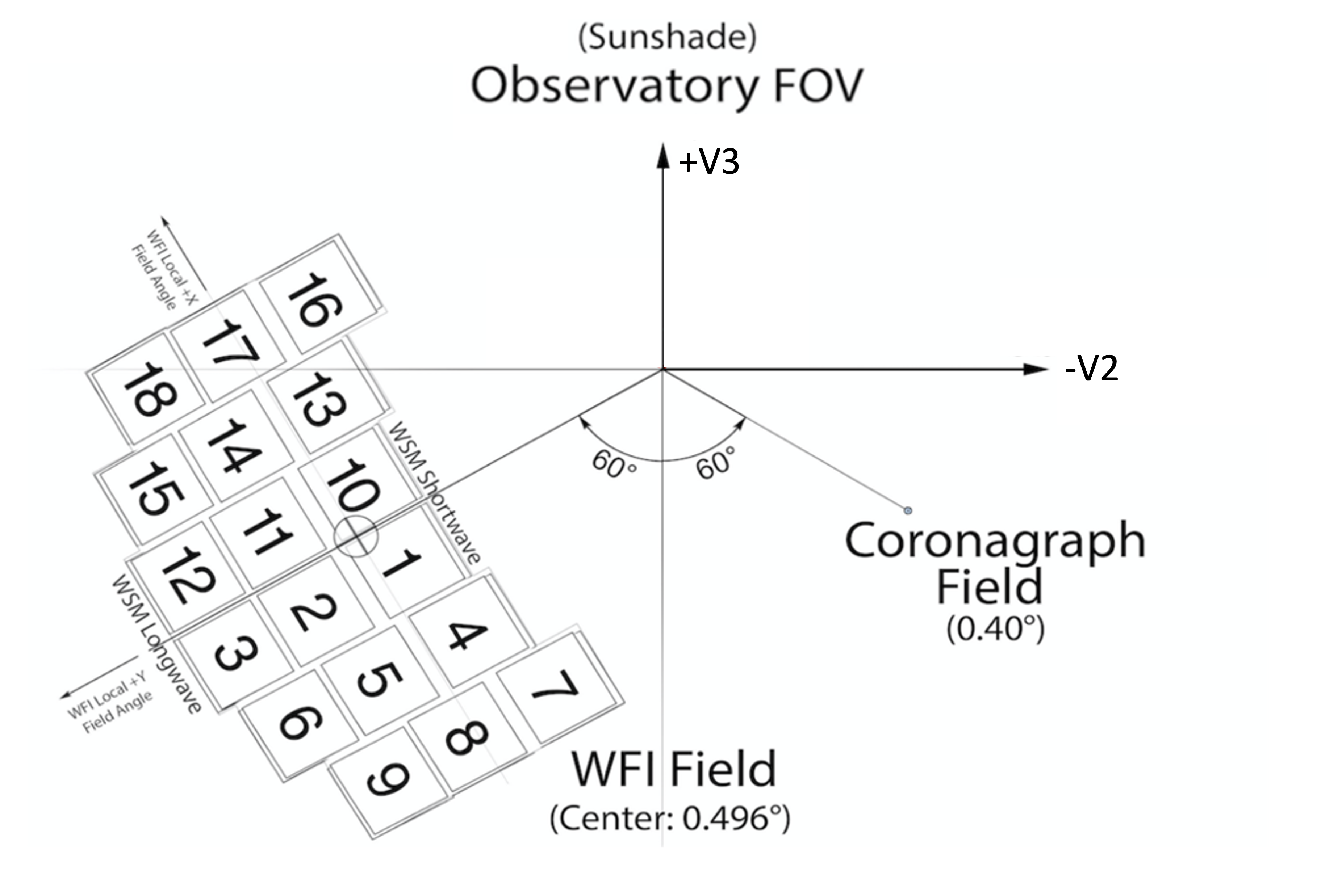
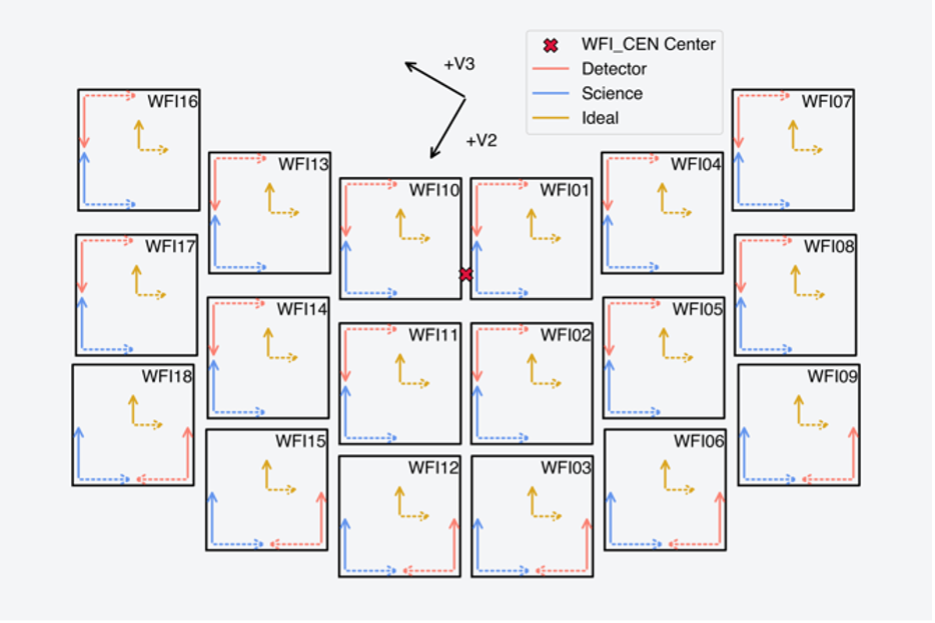
A more complicated case is the need to observe a target with a custom offset. For example, if we want to place a bright star with coordinates (RA1, Dec1) in the top west corner of the WFI focal plane, we would need to place the target at approximately [dX, dY] = [-0.4118, 0.20625] degrees from the center of the focal plane. To calculate the new coordinates of the center of the focal plane (RA2, Dec2) and still be able to use the nominal position angle (which depends on the epoch), we can use the following function:
import rosalia as rs
# Let's say that we want to observe a target at the following coordinates:
ra = 56.6583333  # Right ascension, in degrees.
dec = +24.1780556 # Declination, in degrees.
dX = -0.4118
dY = 0.20625
from astropy.time import Time

date = Time("2027-06-01T00:00:00") # Date of the observation, in Astropy Time YYYY-MM-DDTHH:MM:SS format.

offset_pointing = rs.telescopes.Roman.find_wfi_center_for_offset_target(ra_target=ra, dec_target=dec, mjd=date.mjd, dX=dX, dY=dY)
rs.telescopes.Roman.find_wfi_center_for_offset_target will return the new coordinates of the center of the focal plane (ra_wficen, dec_wficen), the position angle of the WFI focal plane (PA_WFI_offset), the V3 position angle (V3PA_offset), and the V3 position angle for the non-offset pointing (V3PA_origin).
Transforming ASDF to FITS
ASDF is the successor of FITS format and has been adopted since JWST. While GUI visualizers like SAO DS9 are not yet compatible with ASDF (see JWST Users Committee note), ROSALIA provides an easy way to extract useful information from ASDF files through exposure-inspector:
import rosalia as rs
exposure_identity = rs.utils.exposure_inspector(input_name="your_exposure.asdf")
rs.utils.exposure_inspector returns a series of fields containing basic information from the ASDF tree, including the name of the telescope, instrument, detector, pointing information (RA/Dec), WCS of the header(s). For Roman and Hubble Space Telescope exposures, ROSALIA will automatically find the filter transmission curve in SVO server <https://svo2.cab.inta-csic.es/svo/theory/fps/> and include it in the output.
If the input FITS files correspond to multiple SCI exposures (e.g., one per SCA), the output will be a list of arrays, one per exposure. For Roman/WFI, one ASDF file per SCA (detector) will be generated. To combine the information from multiple ASDF files, we can use a pattern. For example, if we have 18 ASDF files named your_exposure_SCA01.asdf, your_exposure_SCA02.asdf, …, your_exposure_SCA18.asdf, we can use the following command to extract the information from all 18 files at once:
The output will be a single FITS file containing the combined information from all 18 ASDF files, which can be easily visualized in SAODS9 or any other FITS viewer. The name of the output FITS file will be the same as the input pattern, but with the * replaced by _ and the extension changed to .fits. For example, the output file for the previous command will be named your_exposure_SCA_.fits.
exposure-inspector can be used in the terminal as well, by providing the name of the ASDF file as an argument. For example:
Producing the same resutls as the previous Python command, but in the terminal.
Generating some mock Roman / WFI observations
ROSALIA works over level 2 images. We can use romanisim to generate mock Roman/WFI exposures. This is particularly useful for testing ROSALIA’s functionalities on Roman data, and for visualizing the impact of stray light on Roman/WFI observations. Note that this is not needed to run ROSALIA, as the main modules will accept coordinates and WCS information as input, and will generate dummy images. However, romanisim includes multiple processing effects on to generate a realistic Roman/WFI exposure, and then use ROSALIA to analyze the stray light in that exposure. We encourage users to visit the official webpage of romanisim for more information on the package and its functionalities: https://romanisim.readthedocs.io/en/latest/, but we include a simple example here to get you started.
Install
romanisimand generate a Roman/WFI example image. For this experiment—and to maximize the visualization of stray-light—we will simulate an exposure near Orion’s Belt.pip install romanisim romanisim-make-image --radec 83.3419927 -1.9665163 RST_WFI_ROSALIA_test_Orion_Belt_SCA{}.asdf --roll -45 --sca -1 --bandpass F158 --level 2 --usecrds
Note
romanisimis a package in active development. Please visit the official webpage for more information on usage: https://romanisim.readthedocs.io/en/latest/Notice the {} in the filename and the -1 in the –sca argument. That will instruct
romanisimto generate files for the 18 Roman / WFI SCAs. The result from the previous command will be a series of files (18 in total, one ASDF file per Roman / WFI SCA) in the local directory.-rw-r--r-- 1 user staff 391M Nov 26 16:02 RST_WFI_ROSALIA_test_Orion_Belt_SCAWFI01.asdf -rw-r--r-- 1 user staff 391M Nov 26 15:39 RST_WFI_ROSALIA_test_Orion_Belt_SCAWFI02.asdf -rw-r--r-- 1 user staff 391M Nov 26 15:42 RST_WFI_ROSALIA_test_Orion_Belt_SCAWFI03.asdf -rw-r--r-- 1 user staff 391M Nov 26 15:46 RST_WFI_ROSALIA_test_Orion_Belt_SCAWFI04.asdf -rw-r--r-- 1 user staff 391M Nov 26 15:49 RST_WFI_ROSALIA_test_Orion_Belt_SCAWFI05.asdf -rw-r--r-- 1 user staff 391M Nov 26 15:53 RST_WFI_ROSALIA_test_Orion_Belt_SCAWFI06.asdf -rw-r--r-- 1 user staff 391M Nov 26 15:56 RST_WFI_ROSALIA_test_Orion_Belt_SCAWFI07.asdf -rw-r--r-- 1 user staff 391M Nov 26 15:59 RST_WFI_ROSALIA_test_Orion_Belt_SCAWFI08.asdf -rw-r--r-- 1 user staff 391M Nov 26 16:03 RST_WFI_ROSALIA_test_Orion_Belt_SCAWFI09.asdf -rw-r--r-- 1 user staff 391M Nov 26 16:06 RST_WFI_ROSALIA_test_Orion_Belt_SCAWFI10.asdf -rw-r--r-- 1 user staff 391M Nov 26 16:10 RST_WFI_ROSALIA_test_Orion_Belt_SCAWFI11.asdf -rw-r--r-- 1 user staff 391M Nov 26 16:13 RST_WFI_ROSALIA_test_Orion_Belt_SCAWFI12.asdf -rw-r--r-- 1 user staff 391M Nov 26 16:22 RST_WFI_ROSALIA_test_Orion_Belt_SCAWFI13.asdf -rw-r--r-- 1 user staff 391M Nov 27 07:14 RST_WFI_ROSALIA_test_Orion_Belt_SCAWFI14.asdf -rw-r--r-- 1 user staff 391M Nov 27 08:53 RST_WFI_ROSALIA_test_Orion_Belt_SCAWFI15.asdf -rw-r--r-- 1 user staff 391M Nov 27 08:56 RST_WFI_ROSALIA_test_Orion_Belt_SCAWFI16.asdf -rw-r--r-- 1 user staff 391M Nov 27 09:00 RST_WFI_ROSALIA_test_Orion_Belt_SCAWFI17.asdf -rw-r--r-- 1 user staff 391M Nov 27 09:04 RST_WFI_ROSALIA_test_Orion_Belt_SCAWFI18.asdf
These 18 files represent a single Roman/WFI level 2 (calibrated, non-combined) exposure.
Estimating the surface brigthness limit of Roman WFI observations
In this tutorial you can find an example of use of a very approximate function to estimate the surface brightness limit of Roman/WFI observations as a function of the exposure time and the level of stray light in the field. This is not meant to be a rigorous calculation, but rather an example of how to use ROSALIA to quickly estimate the impact of stray light on the surface brightness limit of Roman/WFI observations.
This is a very crude solution that should be considered as maximum surface brightness limit. Real surface brightness limits will be brighter (worse) than this estimate, as it does not take into account systematic effects like flat field, CTE, bias, or gradients due to stray-light. The only limiting factor is photon noise from Zodiacal light. However, for most observations, Zodiacal light is 95% of the limit, so it will work sufficiently well for the vast majority of purposes.
For a more realistic simulation, we recommend to simulate the individual exposures with Romanisim: https://romanisim.readthedocs.io/en/latest/, and then combine the individual exposures. The resulting noise then will include the systematic effects mentioned above.